




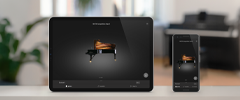


The Sound Museum control app allows owners of supported Kawai digital pianos to explore the musical instrument sounds available within their piano, listen to a variety of demonstration pieces, and store favourite sounds for convenient recall - all from the convenience of an iOS device.


Every Kawai digital piano contains a rich variety of beautiful instrument voices. Sound Museum is a musical learning app that invites players of all levels to explore these sounds as if wandering through an instrument museum. Bringing together modern convenience with the joy of playing, its elegant touch interface makes discovering, learning, and customizing your piano's voices completely intuitive.

With a single touch, you can easily browse different instrument voices organized by category. Read about each instrument’s unique acoustic characteristics and ideal musical genres, while viewing clear images and descriptions. To spark your creativity, listen to professionally recorded demonstration pieces carefully chosen to bring out the full charm and potential of each specific sound.

Expand your performance possibilities by exploring your piano's built-in combination modes. You can seamlessly layer two voices using Dual mode, or split the keyboard with Split mode to play different instruments with your left and right hands. Adjusting the volume balance between sounds or changing the split point is smooth and completely visual, giving you effortless artistic control.
(Note: Available on Kawai digital pianos equipped with Dual and Split functions.)

When you find a sound pairing or a customized setting that feels just right, you can easily save it. Sound Museum lets you store your favorite configurations into one of eight Favourite memories, allowing you to instantly recall your preferred setup the next time you sit down to play.

Focus entirely on your music without the distraction of cables. For pianos equipped with Bluetooth® MIDI, the app connects effortlessly to your iOS device wirelessly. If your piano does not have built-in Bluetooth®, wireless connection is fully supported via the Quicco Sound mi.1 Bluetooth® MIDI interface, keeping your creative environment elegant and organized.
Wired Connection: To enjoy a wired connection using a USB cable, an official Apple accessory (such as the 'Lightning to USB Camera Adapter', 'Lightning to USB 3 Camera Adapter', or 'Apple iPad Camera Connection Kit') is required.
Wireless Connection: Cable-free connectivity is fully supported via the Quicco Sound 'mi.1' Bluetooth® MIDI interface.
Firmware Updates: When pairing via Bluetooth® MIDI with an iPhone 7 or iPhone 7 Plus, a quick update to the latest BLE MIDI firmware for the CN37, CN27, ES110, or QuiccoSound mi.1 may be required to ensure smooth performance.