


How can I achieve the best sound quality from the Line Out connectors on my ES60 portable piano?
The ES60 portable digital piano includes various settings that can be used to adjust the tonal character and performance of the instrument's sound. The "Speaker EQ" setting can help to enhance the sound of the instrument when using the built-in speakers, and is therefore turned On and set to "Normal" by default.
However, the "Speaker EQ" setting also influences the tonal character of the sound produced by the instrument's Line Out connectors. Therefore, when connecting the ES60 to external speakers, or recording the instrument using the Line Out connectors, it is recommended to set the "Speaker EQ" setting to Off, in order to achieve the best sound quality.
Turning off the "Speaker EQ" setting
Press and hold the [FUNCTION] button, then press the F#6 key.
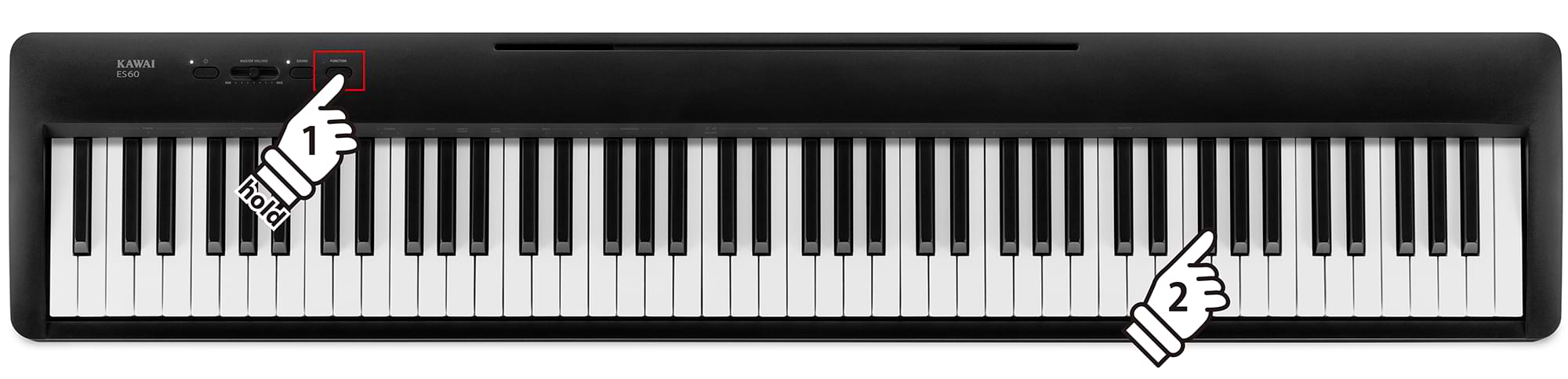
To restore the above "Speaker EQ" setting to "Normal", turn the instrument Off and On again.
For more information about "Speaker EQ" and other functions and settings, please refer to the ES60 Owner's Manual PDF, available via the link below: