




How do I enable Bluetooth on my CX102/CX202 digital piano?
In order to comply with international wireless regulations, the CX102 and CX202 digital pianos ship with Bluetooth turned Off by default.
This article outlines how to turn on the CX102 and CX202's Bluetooth functionality, allowing the instruments to communicate with smart devices wirelessly in order to use apps such as PianoRemote.
Turning on the Bluetooth function
(While the digital piano is turned on)
Press and hold the [METRONOME] and [SOUND SELECT] buttons for five seconds.
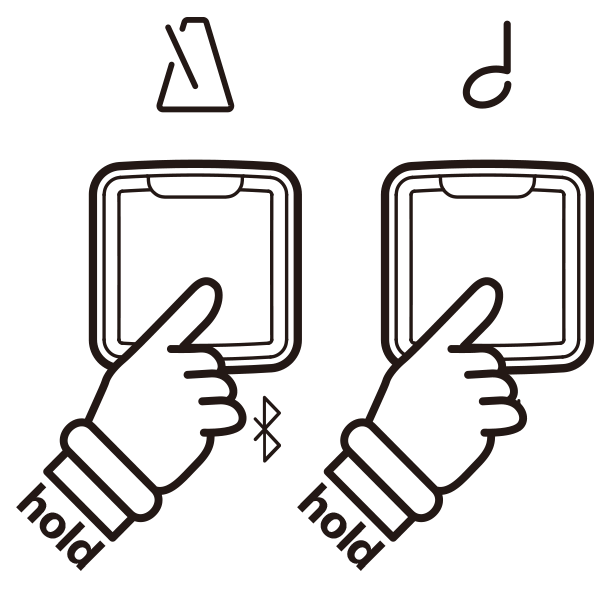
The LED indicators for the [METRONOME] and [SOUND SELECT] buttons will flash and the Bluetooth function will turn on.
To turn Bluetooth off, repeat the above operation.
* On the CX102, this operation will turn on Bluetooth MIDI. On the CX202, this operation will turn on Bluetooth MIDI and Bluetooth Audio.
* The current Bluetooth state will be stored and recalled automatically the next time the instrument is turned on.